Virtual DOM: React's lightweight version of actual DOM

Virtual DOM is a fundamental ReactJS concept. You must have heard of this if you have written code in ReactJS. So today, let's clear out the fuss about Virtual DOM and understand how it works and why ReactJS uses it.
What is DOM?
DOM is a programming interface that allows us to create, change or remove elements from a web document - such as HTML. The structure of DOM is represented by a ‘node tree’.
Now, the developers can manipulate the DOM i.e. add and remove elements and modify their appearance as the user acts on the client side.
For these DOM operations to reflect on the web page, the page will have to re-render.
The problem: DOM manipulation is costly!
DOM manipulation is the heart of the modern, interactive web. On the other end, it is also a lot slower than most JavaScript operations. Therefore, frequent update to the DOM is costly because every time the DOM is manipulated, the whole page has to be re-rendered to reflect DOM updates. It degrades the web page performance and makes it slow as the browser has to recalculate the CSS and repaint the webpage.
We all know that a tree structure represents the DOM. Hence, it may be costly if we have to traverse a good portion of the DOM tree to find the node we have to update.
What is Virtual DOM?
Virtual DOM in ReactJS is a “virtual” representation of actual DOM. In ReactJS, every DOM element has a corresponding Virtual DOM object.
The virtual DOM has the same properties as we have in a normal DOM object, but in virtual DOM we cannot directly change what is on the screen, unlike the DOM object. It is only available as a strategy to prevent redraw of all the elements except the necessary ones during re-render.
How does the Virtual DOM work in ReactJS?
A virtual DOM for that render is created and kept in memory when the initial render occurs. Whenever an update occurs in the render, ReactJS automatically creates a new virtual DOM tree for the update.
Now, for every update done on the virtual DOM, ReactJS compares the virtual DOM with the previous snapshot. So, with the help of this comparison done by ReactJS, it automatically figures out which part of the ReactJS component needs to be updated and ensures the updated node matches up with the actual DOM. ReactJS uses the diffing algorithm for this process and the process is called diffing.
When ReactJS implements the diffing algorithm, it starts by comparing whether or not both snapshots have the same root element. If they have the same root element, ReactJS moves further down the line and checks the children.
<div>
         <div>
               <h1>Hello World</h1>
         </div>
         <div>
               <h1>Hello Rohit</h1>
         </div>
</div>
<div>
         <div>
               <h1>Hello World</h1>
         </div>
         <div>
               <h1>Hello Rahul</h1>
         </div>
</div>
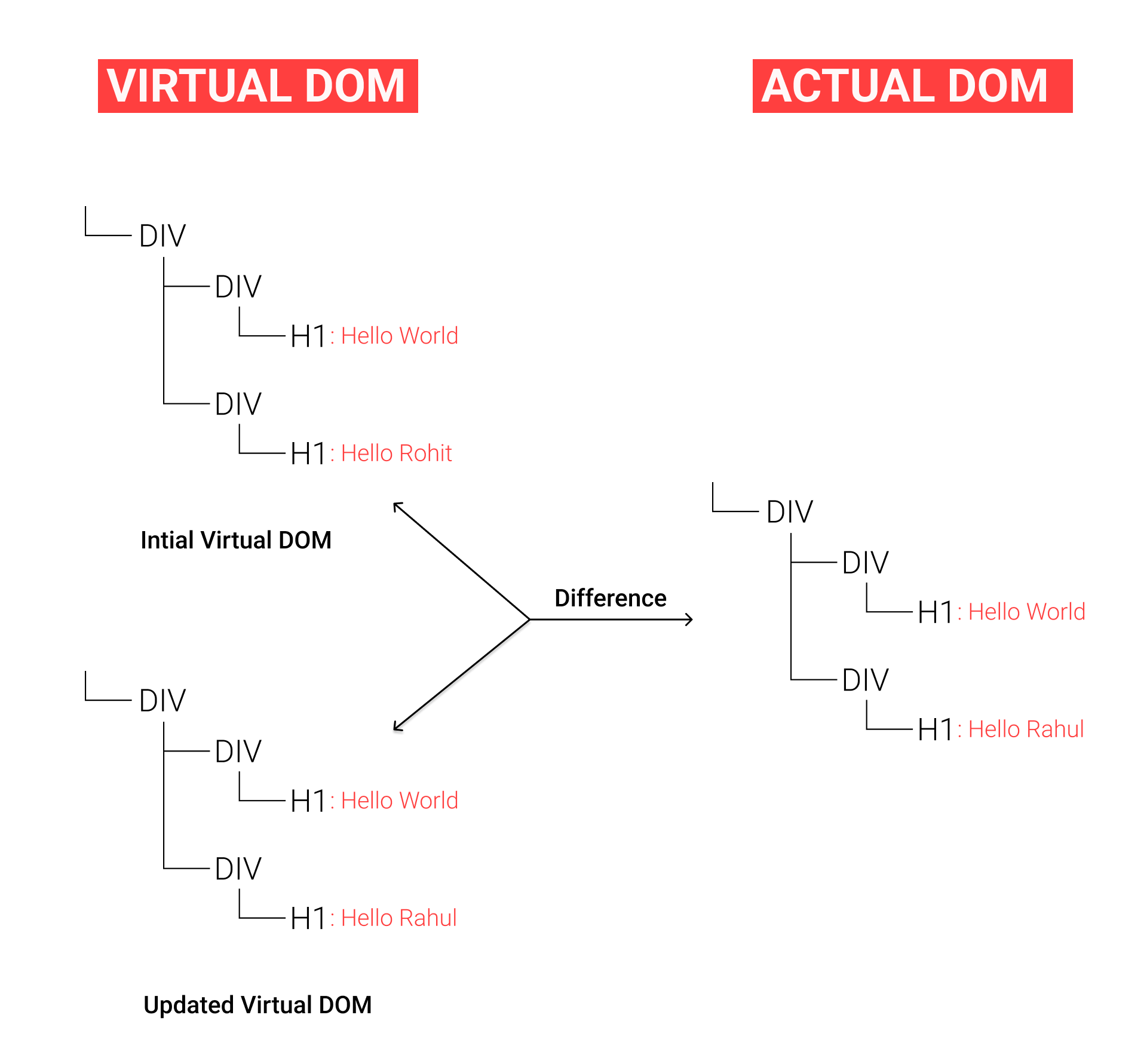
Whenever the DOM receives an update, it only changes the content of the DOM as we can find in the second block of code.
Why ReactJS uses Virtual DOM?
In ReactJS applications, each UI section is known as a component and each component has a state. A component is re-rendered whenever the state of that component changes. So when the state changes, ReactJS updates the virtual DOM tree. When this virtual DOM tree is updated, ReactJS compares the old and current DOM by the diffing process we talked about above. Hence, once this virtual DOM changes, ReactJS then updates only those objects in the actual DOM. By this technique, you can see that the performance is optimized.
You don’t have to care about updating the virtual DOM yourself. You just have to render the component needed and ReactJS handles the update for you. All that is needed from your end is to update the state of your UI component and ReactJS takes care of the rest. Isn’t it cool, right!?
Conclusion
Virtual DOM is a strategy that ReactJS uses which optimizes the performance of an application. It provides a mechanism to compare two render trees and only modifies what is necessary on the actual DOM.
I hope you enjoyed reading this blog. Please share your valuable thoughts in the comment section.
Follow me on Twitter: https://twitter.com/imsunilballani
Connect with me on LinkedIn: https://www.linkedin.com/in/sunil-ballani-17b31b200

